

| 일 | 월 | 화 | 수 | 목 | 금 | 토 |
|---|---|---|---|---|---|---|
| 1 | 2 | |||||
| 3 | 4 | 5 | 6 | 7 | 8 | 9 |
| 10 | 11 | 12 | 13 | 14 | 15 | 16 |
| 17 | 18 | 19 | 20 | 21 | 22 | 23 |
| 24 | 25 | 26 | 27 | 28 | 29 | 30 |
| 31 |
- Router
- 공유기
- mr 100
- UART
- openwrt
- SMM
- e
- tp link
- 익스플로잇
- exploit
- linux ring 권한 구조
- mips
- Kernel
- fini array
- tl mr 100
- Cross-cache attack
- exit handler overwrite
- physmap
- 라우터
- protection ring
- hardware hakcing
- ROP
- Slab free list poisoning
- 커널
- kernel exploit
- memory
- Pwnable
- System Management Mode
- Today
- Total
haehet
[Linux kernel] 링 권한 구조와 SMM(System Management Mode) 본문
이번 글에서는 x86의 보호 링(Protection Ring) 구조를 정리하고 Ring -2에 있는 SMM(System Management Mode)에 대해 정리해보겠다.
1. 링 권한 구조
x86 아키텍처는 코드가 실행될 수 있는 권한 수준을 Protection Ring(Ring 0~3) 으로 나눠 관리한다. 숫자가 낮을수록 권한이 높고, 리눅스에서는 보통 다음처럼 사용한다.
● Ring 3 (User mode): 일반 사용자 프로세스
● Ring 0 (Kernel mode): 리눅스 커널
유저 프로세스는 privileged instruction을 실행할 수 없고 커널 메모리에도 직접 접근할 수 없다. 커널 기능이 필요하면 시스템 콜을 통해 Ring 0 경계로 진입한다.
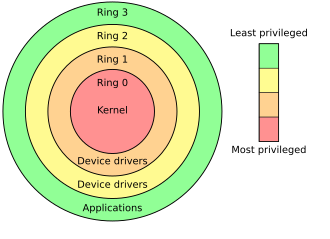
보통 Ring 0까지만 다루지만 더 아래의 권한도 존재한다. 가상화가 도입되면서 하이퍼바이저 계층(Ring -1)이 등장했고 그보다 더 아래에는 펌웨어 영역에서 동작하는 SMM(System Management Mode, Ring -2) 이 존재한다. (사실 ring -3도 있는 것 같긴한데 뇌절이라 zz 설명 안하겠다.)
2. Ring -1, Ring -2
2.1 Ring -1: Hypervisor
Intel VT-x / AMD-V 같은 하드웨어 가상화 확장에서는 하이퍼바이저가 커널보다 더 낮은 계층에서 실행된다.
2.2 Ring -2: SMM(System Management Mode)
시스템 관리 모드(SMM)는 전력 관리, 하드웨어 제어 등 시스템 전체 기능을 처리하기 위한 특수 목적 운영 모드이다. SMM은 펌웨어(BIOS 또는 UEFI)에 의해 사용되며 시스템 관리 인터럽트(SMI)를 통해서 진입할 수 있다.
3. SMM(System Management Mode) 동작
SMM에 진입하면 CPU는 현재 실행 중인 OS 문맥을 모두 저장한 뒤 SMRAM(System Management RAM) 이라는 별도의 메모리 영역으로 진입한다. SMM 내에서 코드는 시스템 관리 인터럽트(SMI)에 대한 핸들러로 동작하며 작업이 끝나면 RSM(Return from SMI) 명령을 통해 다시 원래 실행 상태로 복귀한다.
부팅 로그를 보면 다음과 같이 RAM에 SMRAM 영역이 생기는 것을 확인 가능하다.
Q35SmramAtDefaultSmbaseInitialization: SMRAM at default SMBASE found
DetectSmbiosVersion: SMBIOS version from QEMU: 0x0208
NegotiateSmiFeatures: using SMI broadcast
NegotiateSmiFeatures: CPU hotplug with SMI negotiated
NegotiateSmiFeatures: CPU hot-unplug with SMI negotiated
SmbiosCreateTable() re-allocate SMBIOS 32-bit table
SMM IPL opened SMRAM window
SMM IPL found SMRAM window 7F001000 - 7FFFFFFF
SMRAM attributes: 0000000000000008
SMM IPL loading SMM Core at SMRAM address 7FFEE000
SMM IPL calling SMM Core at SMRAM address 7FFF1F9F
Loading SMM driver at 0x0007FFE2000 EntryPoint=0x0007FFE4274 CpuIo2Smm.efi
Loading SMM driver at 0x0007FFD8000 EntryPoint=0x0007FFDB706 SmmLockBox.efi
Loading SMM driver at 0x0007FFBE000 EntryPoint=0x0007FFC5CF8 PiSmmCpuDxeSmm.efi
SMRR Base: 0x7F000000, SMRR Size: 0x1000000
SMRAM TileSize = 0x00002000 (0x00001000, 0x00001000)
SMRAM SaveState Buffer (0x7FFB6000, 0x00008000)
CPU[000]  APIC ID=0000  SMBASE=7FFAE000  SaveState=7FFBDC00  Size=00000400
Initialize IDT IST field for SMM Stack Guard
SMM IPL registered SMM Entry Point address 7FFF5DD7
SMM CPU Module exit from SMRAM with EFI_SUCCESS
SMM IPL closed SMRAM window
Loading SMM driver at 0x0007FF92000 EntryPoint=0x0007FF95864 FvbServicesSmm.efi
Installing QEMU flash SMM FVB
Loading SMM driver at 0x0007FF7B000 EntryPoint=0x0007FF82BE0 VariableSmm.efi
Loading SMM driver at 0x0007FEDE000 EntryPoint=0x0007FEE16A6 CpuHotplugSmm.efi
Error: SMM image at 0007FEDE000 start failed: Unsupported
Loading SMM driver at 0x0007FEDB000 EntryPoint=0x0007FEE0A6C SmmFaultTolerantWriteDxe.efi
[Variable]SMM_END_OF_DXE is signaled
SMM IPL locked SMRAM window
4. SMM과 통신하기
SMM과 소통하기 위해서는 Communication buffer에 값을 써두면 된다. (guid는 드라이버 마다 다르다.)
typedef struct {
  EFI_GUID  HeaderGuid;
  UINTN     MessageLength;
  UINT8     Data[1];
} EFI_MM_COMMUNICATE_HEADER;
보통 소통을 도와주기 위한 래퍼함수 (communicate)가 존재한다. 하지만 특정 CTF문제에서는 그런 기능을 제공하지 않을 때가 많다. 따라서 직접 root 권한에서 소통을 하는 방법을 알아보자.
위에서 말했듯이 SMM과 소통을 하기 위해서는 communication buffer에 값을 써둬야 한다. 만약 래퍼가 없으면 우리가 직접 communication buffer로 쓸 장소를 지정해야 한다.
#define SMM_CORE_PRIVATE_DATA_SIGNATURE SIGNATURE_32 ('s', 'm', 'm', 'c')
typedef struct {
  UINTN                  Signature;
  EFI_HANDLE             SmmIplImageHandle;
  UINTN                  SmramRangeCount;
  EFI_SMRAM_DESCRIPTOR   *SmramRanges;
  EFI_SMM_ENTRY_POINT    SmmEntryPoint;
  BOOLEAN                SmmEntryPointRegistered;
  BOOLEAN                InSmm;
  EFI_SMM_SYSTEM_TABLE2  *Smst;
  VOID                   *CommunicationBuffer;
  UINTN                  BufferSize;
  EFI_STATUS             ReturnStatus;
  EFI_PHYSICAL_ADDRESS   PiSmmCoreImageBase;
  UINT64                 PiSmmCoreImageSize;
  EFI_PHYSICAL_ADDRESS   PiSmmCoreEntryPoint;
} SMM_CORE_PRIVATE_DATA;
Communication buffer를 지정하는 방법은 먼저 메모리에서 다음 구조체를 찾아 준다. (CTF 관점에서 설명할 거기 때문에 qemu를 기준으로 설명하겠다, 만약 qemu 환경이 아니라면 /dev/mem을 open 후 메모리를 매핑 받아가면서 smmc signature를 찾아도 될듯하다.)
먼저 주로 SMM이 할당되는 영역의 물리 주소는 고정이기 때문에 부팅 로그 등을 확인해서 주소를 찾아준다. 그리고 shell에서 cat /proc/iomem을 열어서 할당을 확인해본다.
# cat /proc/iomem
00000000-00000fff : Reserved
00001000-0002ffff : System RAM
00030000-0004ffff : Reserved
00050000-0009ffff : System RAM
000f0000-000fffff : System ROM
00100000-7e8eefff : System RAM
  0ea00000-0f3fffff : Kernel code
  0f400000-0f6a8fff : Kernel rodata
  0f800000-0f8ea67f : Kernel data
  0fadb000-0fbfffff : Kernel bss
7e8ef000-7eaeefff : Reserved
7eaef000-7eb74fff : System RAM
7eb75000-7eb7efff : ACPI Tables
7eb7f000-7ebfefff : ACPI Non-volatile Storage
7ebff000-7effffff : System RAM
7f000000-7fffffff : Reserved
b0000000-bfffffff : Reserved
c0040000-c005ffff : 0000:00:01.0
c0060000-c0060fff : 0000:00:1f.2
fffc0000-ffffffff : 0000:00:01.0
100000000-17fffffff : System RAM
그 다음에는 SMM과 관련된 영역 (Reserved가 적혀 있으면서 디버깅 로그에서 확인)을 qemu-monitor에서 dump해준다.
haehet@haehet:~/wargame$ nc localhost 4444
QEMU 8.0.2 monitor - type 'help' for more information
(qemu) pmemsave 0x7e000000 0x1000000 dump.bin
pmemsave 0x7e000000 0x1000000 dump.bin
(qemu) q
haehet@haehet:~/wargame$ grep -oba "smmc" ./dump.bin | awk -F: '{printf "0x%x: %s\n", $1, $2}'
0x5b9400: smmc
0xace380: smmc
그러면 다음과 같이 smmc signature를 찾을 수 있다. 그 후 다음과 같이 해당 영역에 할당 후 내부 필드를 채워주면된다.
(iopl 명령어는 유저모드에서 outb 같은 저수준 I/O 명령어를 사용하기 위함이다.)
if (iopl(3) != 0) {perror("iopl(3)");}
int fd = open("/dev/mem", O_RDWR | O_SYNC);
uint64_t smmc_page_phys = SMMC_PHYS_ADDR & ~0xFFFULL;
uint8_t *smmc_page = mmap(NULL, 0x1000, PROT_READ | PROT_WRITE,MAP_SHARED, fd, smmc_page_phys);
uint8_t *smmc = smmc_page + (SMMC_PHYS_ADDR & 0xFFFULL);
*(uint64_t *)(smmc + 0x38) = COMM_PHYS_ADDR;  // CommunicationBuffer
*(uint64_t *)(smmc + 0x40) = total_sz;        // CommunicationBufferSize
커뮤니케이션 버퍼는 다음과 같이 SMM이 접근 가능한 메모리에 mmap을 해주면된다.
#define COMM_PHYS_ADDR 0x7e8ef000ULL
uint8_t *comm = mmap(NULL, 0x2000, PROT_READ | PROT_WRITE, MAP_SHARED, fd, COMM_PHYS_ADDR);
그 후 outb를 통해 예약된 포트에 값을 써서 trigger하면 된다.
#define SW_SMI_PORT   0xB2
#define SW_SMI_DATA   0xB3
static inline void smi(void) {
    outb(0, SW_SMI_DATA);
    outb(0, SW_SMI_PORT);
}
이번 글에서는 리눅스의 링 권한 구조와 SMM에 대해 알아보았다. 조만간 UFEI랑 리눅스, 컴퓨터 부팅과정과 관련된 공부를해야겠다.
reference: https://en.wikipedia.org/wiki/Protection_ring
https://www.intel.com/content/www/us/en/developer/articles/technical/intel-sdm.html
https://www.willsroot.io/2023/08/smm-diary-writeup.html
https://towerofhanoi.it/writeups/2022-08-15-uiuctf-2022-smm-cowsay/
https://raw.githubusercontent.com/tianocore/edk2/master/MdePkg/Include/Protocol/SmmCommunication.h
'Linux kernel' 카테고리의 다른 글
| [Linux Kernel] 메모리 관리 2편: Page Allocator (PCP & Buddy System) (0) | 2026.01.09 |
|---|---|
| [Linux Kernel] 메모리 관리 1편: TLB와 Page Table Walk: Multi Level paging 동작 원리 (0) | 2026.01.08 |
| [Linux kernel] 물리 메모리 구조와 PCI driver (0) | 2026.01.01 |
| [Linux kernel] memory map 정리 (0) | 2025.12.31 |
| [Linux kernel] 보안 기법 정리 (0) | 2025.12.30 |